
7 Secrets to Easy Waitlist Management with Waitlister
Growing a waitlist sounds simple until it starts working. One day, you have 12 names. The next day, you have 612. Then the questions begin. “Did my signup go through?” “When do I get access?” “Can I move up the list?” That is the moment when waitlist management stops being a side task and becomes the center of your launch.
Waitlister is built for that moment. It helps you create branded, customizable waitlists, collect signups anywhere, and keep every subscriber organized in one dashboard. It also adds the parts most people forget, like automated welcome emails, real-time analytics, exporting, surveys, and a referral program. If you want waitlist management that feels calm and controlled, this tool is made for you.
Even better, Waitlister is available on AppSumo as a lifetime deal. That matters if you prefer paying once and using the software long-term, especially when waitlist management becomes something you do again and again for new launches.
Quick Snapshot: What Waitlister Helps You Do
At its core, Waitlister takes the chaos out of waitlist management. It provides a clean way to collect sign-ups, engage people immediately, and track growth without guesswork. It’s designed for e-commerce, SaaS, and solopreneurs, but it also fits anyone who needs a clear system for managing demand.
| What you want | What Waitlister gives you | Why it matters for waitlist management |
|---|---|---|
| A page that looks trustworthy | Branded landing pages + customization (colors, fonts, layout) | More signups because people trust what they see |
| Signups across your site | Embeds via simple HTML or iframe | Your waitlist management works where your traffic already is |
| Instant follow-up | Custom welcome emails + broadcasts | People stay excited instead of forgetting you |
| Real growth signals | Advanced analytics + conversion tracking | You improve based on data, not vibes |
| Organic sharing | Referral program + referral counts | Waitlist management becomes a growth engine |
| Clean data | Spam prevention + deliverability filtering | Your list stays useful when it’s time to launch |
Secret 1: Make Your Waitlist Page Feel Like Your Brand
People decide fast. If your page looks generic, they hesitate. If your page looks polished, they join. Waitlister lets you create branded waitlists with full control over design and branding. You can customize colors, fonts, and layout so your waitlist management doesn’t feel like a temporary hack.
You can also add custom disclaimers and messages to build trust. This is one of those small details that helps a lot. A simple line like “We’ll only email you with real updates” makes your waitlist management feel respectful. When people feel respected, they stick around.
What to do right now
- Use one clear headline that says what people are joining.
- Add 3 short benefit bullets that explain why the wait is worth it.
- Add a short trust message near the form, not hidden in the footer.
Secret 2: Put the Form Where People Already Are
Most lost signups are “no thanks.” They are “I didn’t see it.” That’s why embedding matters. Waitlister lets you embed forms anywhere on your website or landing page using simple HTML or iframe code. This makes waitlist management easier because you don’t force every visitor to hunt for one special link.
Here are smart places to embed your form so waitlist management works on autopilot:
- Homepage: Catch curious visitors right away.
- Pricing page: offer a waitlist instead of letting “not ready” visitors leave.
- Blog posts: readers already trust you, so conversion is often higher.
- Product pages: perfect for e-commerce demand capture.
When the form is everywhere your traffic is, waitlist management becomes steady. You stop relying on one post, one ad, or one lucky day.
Secret 3: Use the Thank-You Page to Create Momentum
Most thank-you pages waste a golden moment. The visitor just raised their hand. They’re paying attention right now. Waitlister supports customizable thank-you pages, which is a simple way to make waitlist management feel more guided and professional.
A strong thank-you page can do three things without feeling pushy:
- Confirm they are in and tell them what happens next.
- Invite them to share (especially if you use the referral program).
- Ask one quick question (when you use surveys), so you understand their needs.
This is the kind of waitlist management that feels human because it feels helpful. It’s not pressure. Its direction.
Secret 4: Send a Welcome Email Immediately (Silence Kills Excitement)
The fastest way to cool down a warm lead is to do nothing. Waitlister includes automated welcome emails, so you can send instant thank-you emails upon signup. You can personalize messages with subscriber names and custom content, and track open rates to optimize your emails over time.
This matters because good waitlist management is not only about collecting signups. It’s keeping the relationship alive. A simple welcome email tells the subscriber, “We saw you. You’re in. We’ll take care of you.”
A welcome email that feels real
- Thank them in one sentence.
- Tell them what happens next.
- Give one helpful link (demo, roadmap, or updates page).
- Invite them to share if you run referrals.
When your first email feels friendly, waitlist management becomes easier because people reply less with “Did it work?” and more with real questions you can use to improve the product.
Secret 5: Grow Faster with Referrals (Without Getting Cringe)
If you want to speed things up, you need to share what feels natural. Waitlister includes a referral program and lets you track referral counts. This can turn waitlist management into a simple game: join, share, move up.
Referral programs work best when they are clear. Keep it simple. Tell people what sharing does and why it matters. If your product has limited spots, early access, or phased onboarding, the referral system can make waitlist management feel exciting instead of slow.
Simple referral copy that works
- “Want earlier access? Share your link to move up.”
- “Invite a friend. Referrals help you reach the top faster.”
This approach keeps waitlist management clean. No begging. No awkwardness. Just a clear next step.
Secret 6: Track Growth Like a Pro (Even If You’re Solo)
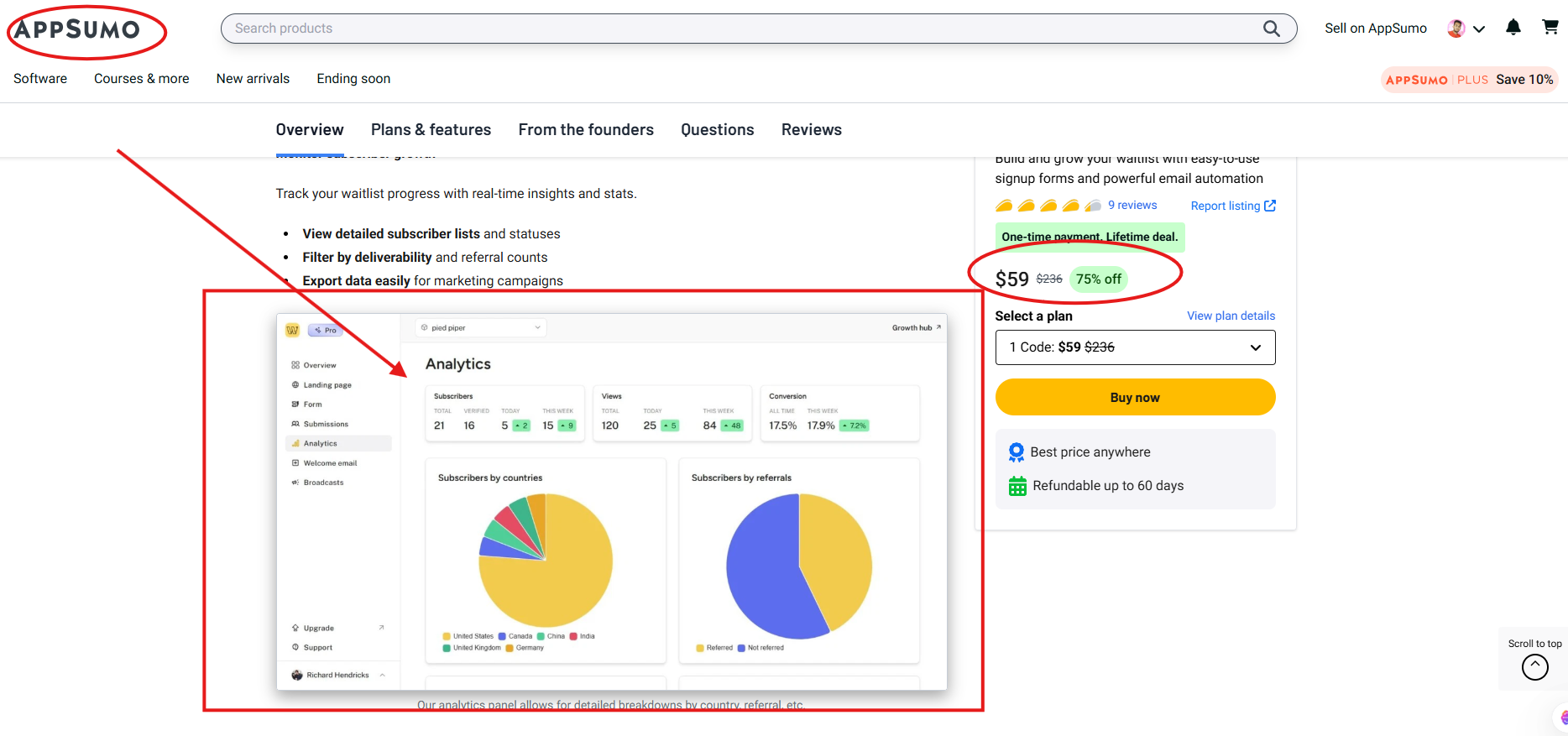
Guessing is expensive. Waitlister offers real-time insights and stats to monitor subscriber growth. You can view detailed subscriber lists and statuses, filter by deliverability and referral counts, and export data for marketing campaigns. The analytics panel also supports detailed breakdowns by country and referral performance.
That’s the kind of waitlist management that lets you make confident decisions. You can see what’s working and adjust fast instead of waiting until launch week to realize the page is not converting.
What to watch each week
- Visits vs. signups: if traffic is strong but signups are weak, fix your headline and offer.
- Referrals: if sharing is low, improve the referral message on the thank-you page.
- Deliverability: keep your list clean so launches don’t flop.
When you track the right signals, waitlist management feels less like “hope” and more like a plan.
Secret 7: Keep Your List Clean (So Your Launch Emails Actually Land)
A big list is not helpful if the emails bounce. Waitlister includes spam prevention and supports filtering by deliverability. This protects your waitlist management from bots, junk signups, and fake addresses that inflate your numbers and weaken your results.
Clean waitlist management means your future campaigns perform better. It also means you trust your own dashboard because the data reflects real people.
Feature Breakdown (What You Get Inside Waitlister)
Waitlister includes a full set of tools designed specifically for waitlist management. These features are listed as included across plans:
- Create landing pages
- Create waitlist forms
- New subscriber notifications
- Surveys
- Phone number collection
- Export subscribers
- Spam prevention
- Advanced analytics
- Customize thank-you pages
- Referral program
- Email broadcasts
- Custom welcome emails
- Track conversions
When you put these together, you get one smooth workflow: collect, welcome, track, grow, export. That is strong waitlist management without duct tape solutions.
AppSumo Lifetime Deal: Why It’s a Big Plus
Waitlister is available on AppSumo as a one-time payment lifetime deal. If you build products, launch offers, or run campaigns more than once, a lifetime option can make your waitlist management costs feel much lighter over time.
Deal terms shown
- Lifetime access to Waitlister
- All future Starter (Tier 1), Pro (Tiers 2–3), or Scale (Tier 4) plan updates
- Redeem your code(s) within 60 days of purchase
- Stack up to 4 codes
- 60-day money-back guarantee
AppSumo pricing and tiers shown
| Plan | One-time payment | Emails per month | What stands out for waitlist management |
|---|---|---|---|
| Plan 1 (1 Code) | $59 | 5,000 | Unlimited sign-ups and waitlists, standard API access |
| Plan 2 (2 Codes) | $118 | 15,000 | Adds custom domains, removes Waitlister branding, adds AI builder (landing page), adds webhooks, adds integrations (Klaviyo, Kit, Mailchimp) |
| Plan 3 (3 Codes) | $177 | 30,000 | Same as Plan 2, with a higher monthly email volume |
If you want branded pages on your own domain and deeper connections to your email stack, the tiers that mention custom domains, removing branding, and integrations are the natural step up. Either way, the point stays the same: you’re buying calmer waitlist management.
Real Questions People Ask (And What That Means for You)
When people consider a tool for waitlist management, they ask practical questions. These answers help you set expectations early and avoid surprises later.
Can I use different languages?
Yes. The text and content are customizable, so you can change wording like button labels into your own language. This is helpful when your waitlist management targets multiple regions.
Can I upgrade later?
Yes. You can upgrade and stack more codes anytime. That means you can start with one level of waitlist management and grow into more capacity when you need it.
Can I add Gumlet video embeds in the landing page editor?
The editor supports video embeds from YouTube and Vimeo, plus direct uploads. Gumlet isn’t supported at the moment.
Can I add custom JavaScript to the page head?
Adding custom JavaScript to the <head> isn’t available for security reasons. Some common integrations are supported, such as Google Analytics ID, Google Ads ID, and Facebook Ads ID.
Who Should Buy Waitlister?
If your product has demand, you need waitlist management. If your demand is growing, you need it even more. Waitlister is especially useful for:
Ecommerce
You can capture interest when items are out of stock and turn “not today” into “notify me.” With built-in exporting, analytics, and automation, your waitlist management becomes a repeatable system instead of a one-time scramble.
SaaS
If you onboard in waves, run betas, or open features gradually, you need to know who is waiting and how engaged they are. Waitlister makes waitlist management easier with dashboards, welcome emails, referrals, and real-time tracking.
Solopreneurs
If you sell courses, coaching, or limited seats, you need a professional way to keep order. A clean system makes you look organized, and good waitlist management makes people more confident to buy when you open.
Final Push (No Hype, Just the Truth)
If you are reading this, you probably already have an interest. The only question is whether you will manage that interest well. Waitlister helps you do waitlist management in a clean, confident way: branded pages, embedded forms, automated welcome emails, referral growth, advanced analytics, and easy exporting.
And because it’s on AppSumo with a lifetime deal and a 60-day money-back guarantee, you’re not locking yourself into a risky monthly bill just to run waitlist management properly. You can set it up once, use it for this launch, and reuse it again for the next one.
If you want fewer headaches and more signups that actually turn into customers, this is the kind of purchase you’ll feel good about. Waitlister keeps waitlist management simple, and that simplicity is exactly what helps you move faster.
To know about the latest LTD deal, please visit:
The SaaS Talk