
Why TransferChain Pass Password Management Software Is 10× Safer
Passwords should not feel like a daily fight. Yet for many people and teams, that is exactly what they are. You create accounts, you forget logins, you reuse the same “safe enough” password, and you promise yourself you will fix it later. That “later” is where trouble starts, which is why choosing the right password management software is a practical security decision, not a tech hobby.
TransferChain Pass is built for that real-world mess. It helps you store, autofill, and manage passwords across devices, and it also helps teams share access without leaking secrets. It is designed around strong privacy ideas like zero-knowledge encryption, data splitting, and blockchain-secured authorization, so this password management software is not only convenient, it is built to reduce risk at the system level.
And yes, it is available on AppSumo as a lifetime deal, which makes it easier to try without adding another monthly bill. If you want a simple tool that still feels serious, this article will walk you through what TransferChain Pass does, how it protects you, and which plan fits your team.
Quick snapshot (TL;DR, but actually useful)
- What it is: TransferChain Pass is a privacy-first password management software that stores, autofills, generates, and shares passwords.
- What makes it different: It uses client-side & end-to-end encryption, password fragmentation, distributed storage, and blockchain authorization.
- Built for: Developers, marketers, and remote teams who manage many accounts.
- Browser extension: Works with Chrome, Edge, Brave, and Opera.
- Alternatives: Positioned as an alternative to 1Password and LastPass.
- Deal: AppSumo one-time payment lifetime deal with a 60-day money-back guarantee.
The problem TransferChain Pass is solving (and why it matters)
Managing many passwords is not just annoying. It is risky. When you’re juggling a lot of accounts each month, it becomes easy to repeat passwords, save them in the wrong place, or share them in chat “just this once.” Then one compromised login can snowball into bigger access, bigger damage, and bigger stress.
TransferChain Pass opens with a strong reminder: compromised credentials are a major cause of breaches, and that is why password protection needs to be stronger than simple storage. A modern password management software should reduce human mistakes, while also staying safe even when attackers try to break the system itself.
What is TransferChain Pass?
TransferChain Pass is a password management software that lets you store and organize credentials, autofill them in the browser, and share them securely with teammates. It also supports device synchronization, so you can keep access ready when you move between devices.
What stands out is the security design language. Instead of saying “we encrypt your vault” and stopping there, TransferChain Pass describes a layered approach: every password is encrypted, fragmented into chunks, stored in a distributed way, and tied to blockchain-secured authorization for access. That makes this password management software feel built for people who want both usability and strong privacy.
Why TransferChain Pass is “10× safer.”
“Safer” is an easy word to throw around. The real question is: safer how? TransferChain Pass is built around several connected layers that reduce the chance of your data being readable, usable, or fully reachable by the wrong party. That is a key goal of any password management software, but TransferChain Pass pushes it further with data splitting and blockchain-based authorization.
Layer 1: Client-side & end-to-end encryption
TransferChain Pass states that each password is encrypted before it leaves your device. This matters because it reduces the number of places where a password could ever be visible. When encryption happens on the client side, your sensitive data is protected early, not later.
In plain words, this password management software aims to prevent “oops moments,” where data becomes readable somewhere along the path. You want the lock on before anything moves.
Layer 2: Zero-knowledge architecture
TransferChain Pass describes its approach as zero-knowledge. The idea is simple: the system is designed so the provider cannot read, access, or see your password content. That is an important promise for privacy-focused users, because it changes what you are trusting.
With many tools, you are trusting the company, the servers, and the internal controls. With a zero-knowledge style password management software, you are aiming to trust the design and encryption boundaries more than human access.
Layer 3: Password fragmentation (splitting the encrypted data)
TransferChain Pass says each encrypted password is fragmented into chunks on your device. This is a big idea, and it helps to picture it clearly. A complete password record is not stored as one clean piece. It is broken into parts, which reduces the value of any single part on its own.
This is one reason the product describes itself as the safest way to store passwords using encryption, data splitting, and blockchain authorization. It is also a reason this password management software is aimed at people who worry about single-point failures.
Layer 4: Distributed storage (spreading the chunks)
TransferChain Pass explains that the encrypted chunks are distributed to the safest storage providers. The practical benefit is that there is not one simple “vault file” sitting in one place. It becomes harder for an attacker to grab everything in one move.
Good password management software should reduce the blast radius of a breach. Distributed storage supports that goal by design, not by hope.
Layer 5: Blockchain authorization (controlling access in a tougher way)
TransferChain Pass also states that encrypted metadata, including mapping information for fragments, is stored in the blockchain. It uses blockchain authorization for access control. For many readers, the key takeaway is not the buzzword. The key takeaway is stronger, tamper-resistant authorization patterns.
In a typical password management software setup, access control often lives inside a central service layer. TransferChain Pass is presenting a model where authorization is handled in a way that is meant to be harder to manipulate.
So what does all this mean in real life?
It means your passwords are not simply “stored.” They are protected through multiple steps that aim to keep them private end-to-end. It means the product is not only trying to stop theft, but also trying to avoid creating a single, juicy target. That is what many people want from password management software, especially when they share credentials in teams.
Core features you will actually use (daily, not once)
Security is only helpful if you keep using the tool. TransferChain Pass focuses on everyday actions: saving logins, autofilling them, generating strong passwords, syncing across devices, and sharing access safely. That is what a practical password management software should deliver.
Autofill with a browser extension
TransferChain Pass includes a user-friendly browser extension that supports secure autofill. You can access logins instantly and reduce the temptation to copy-paste passwords into random places. That is the quiet power of good password management software: it removes risky habits by making the safe path easier.
Supported browsers (extension)
- Chrome
- Edge
- Brave
- Opera
Secure password sharing for teams
Teams often share access in the worst possible way. They put passwords in chats, documents, emails, or spreadsheets. It works fast, until it doesn’t. TransferChain Pass supports secure password sharing so teammates can get access without exposing secrets in plain text.
This is where password management software becomes a team safety tool, not just personal convenience. Sharing is the moment many leaks happen, so it should be handled with care.
Team permissions and admin console management
TransferChain Pass includes admin console management and granular password permission controls. This matters when you need structure, not chaos. You can manage who can access what, and keep permissions aligned with roles.
In any growing team, password management software needs to support clear control, or people will fall back on unsafe shortcuts. Permissions help you stay organized without slowing work down.
Access logs and transparency
TransferChain Pass highlights access logs so you can see who accessed what. This is important for accountability, especially when many people touch the same set of tools. If you ever had the question “who logged in last?” you already understand why this feature matters.
Some plans also include advanced activity logs, which can be valuable when you want deeper visibility. For password management software used by teams, visibility is part of security.
Synchronization across multiple devices
TransferChain Pass supports sync across multiple devices, so your credentials stay ready when you switch computers or work locations. This reduces password resets and reduces “temporary” unsafe storage. A dependable password management software should follow you without friction.
Built-in strong password generator
TransferChain Pass includes a strong password generator to create long, complex, unique passwords quickly. Then you store them, so you don’t need to remember them. This is one of the fastest ways to upgrade your security habits, because it makes strong passwords feel normal.
When each account has a unique password, one leaked login does not unlock everything else. That is the everyday win you want from password management software.
Who TransferChain Pass is best for
TransferChain Pass is listed as best for developers, marketers, and remote teams. That makes sense because these groups handle many tools, many accounts, and shared logins. In those environments, password sharing and access control are daily needs, not rare events.
If you manage client accounts, ad platforms, analytics dashboards, hosting panels, or internal tools, you know the risk is not only external attackers. The risk is also accidental sharing, weak passwords, and messy offboarding. Strong password management software helps reduce all of that.
TransferChain Pass compared to common alternatives
TransferChain Pass is positioned as an alternative to 1Password and LastPass. Instead of making this a brand fight, it helps to focus on the design approach. TransferChain Pass puts strong emphasis on encryption plus data splitting, plus blockchain authorization. That is the angle.
If you like the idea of reducing single points of failure, this password management software may feel like a better match. If you prefer a more traditional “one vault” approach, you might compare it against your current tool and decide what design you trust more.
AppSumo lifetime deal (plans, terms, and what you get)
TransferChain Pass is available on AppSumo as a one-time payment lifetime deal. It includes a 60-day money-back guarantee, so you can test it in real work, not just in theory. It also notes you must activate your license within 60 days of purchase.
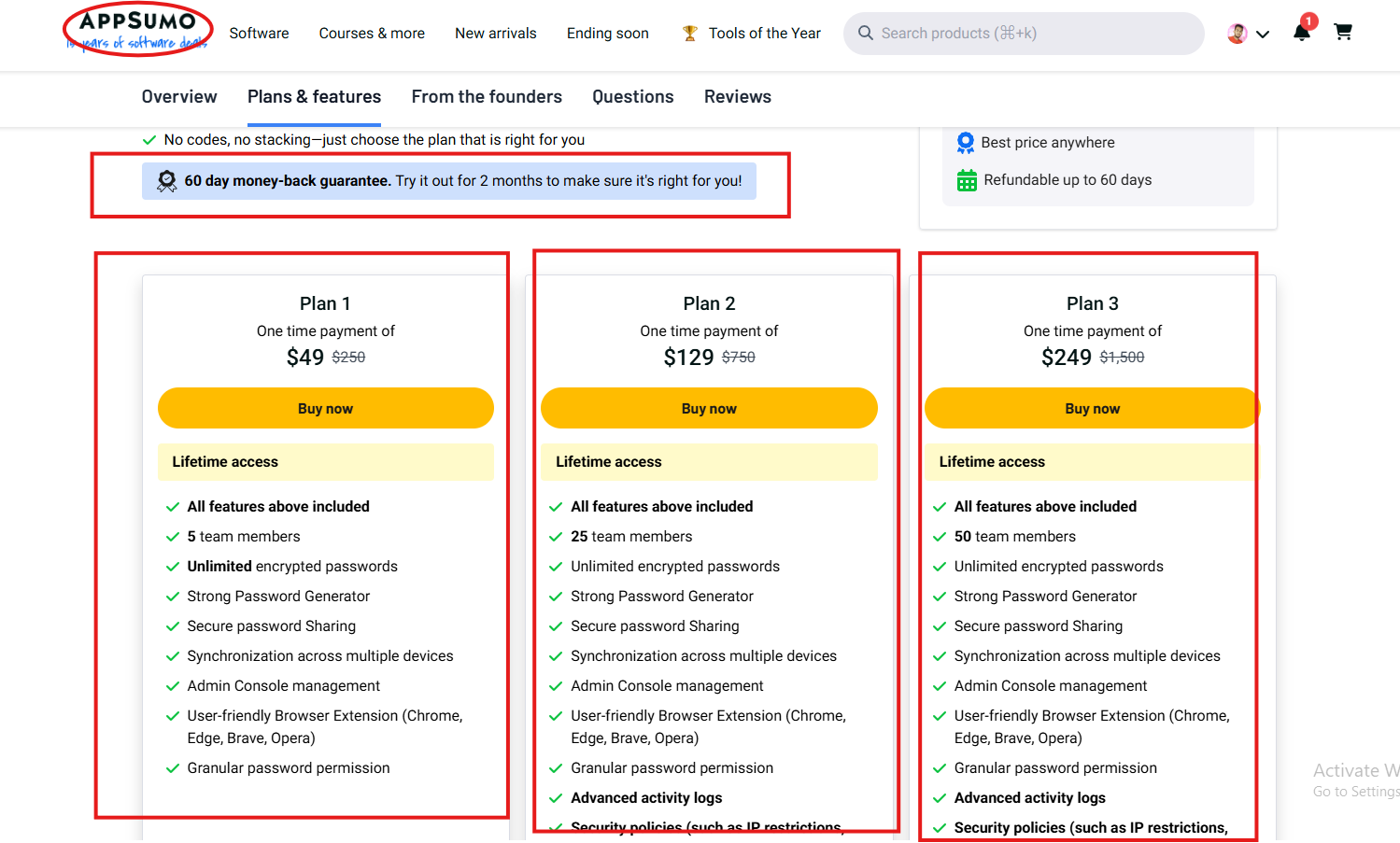
The AppSumo listing also mentions you can upgrade or downgrade between 3 license tiers. That flexibility matters because teams change, and your password management software should be able to scale with you without painful migrations.
What every plan includes
- Lifetime access to TransferChain Pass
- All future Team Plan updates
- Unlimited encrypted passwords
- Strong password generator
- Secure password sharing
- Synchronization across multiple devices
- Admin console management
- User-friendly browser extension (Chrome, Edge, Brave, Opera)
- Granular password permission
Plan comparison table (WordPress-ready)
|
Plan
|
One-time price
|
Team members
|
Best for
|
Extras
|
|---|---|---|---|---|
|
Plan 1
|
$49
|
5
|
Small teams that want secure storage, autofill, and sharing
|
Core features included
|
|
Plan 2
|
$129
|
25
|
Growing teams that need deeper oversight
|
Advanced activity logs + security policies (IP restrictions, password creation)
|
|
Plan 3
|
$249
|
50
|
Larger teams that want the same controls a bigger scale
|
Advanced activity logs + security policies (IP restrictions, password creation)
|
How to set up TransferChain Pass in a clean, stress-free way
Most people fail with password tools for one simple reason: they try to do everything at once. A better plan is to start small, lock down the highest-risk accounts first, and grow from there. That is how password management software becomes a habit.
Step-by-step setup (simple and fast)
- Install the browser extension on Chrome, Edge, Brave, or Opera.
- Add your most important accounts first (email, finance, admin tools, hosting).
- Use the password generator to replace weak or reused passwords right away.
- Turn on secure sharing for accounts that teammates need, and stop sharing passwords in chat.
- Set permissions so each person only sees what they need.
- Check logs regularly at the start, then move to a calm monthly routine.
Once this is done, your password management software is not just storing passwords. It is actively reducing risk while keeping work moving.
Every day, some rules make it even safer (without extra effort)
TransferChain Pass can give you strong protection, but your daily habits still matter. The good news is you do not need complex rules. You only need rules that you can follow on a busy day. That is the real purpose of password management software: making safe behavior easy.
Three rules that work for most teams
- No passwords in messages: Use secure sharing inside the tool instead.
- One unique password per account: Let the generator do the hard work.
- Review access when roles change: Permissions should match today, not last year.
When you follow these simple rules, password management software stops being a passive vault and becomes an active security habit.
FAQ (quick answers, no fluff)
Is TransferChain Pass only for teams?
No. It can work for individuals, too, but the permission controls, sharing, and logs make it especially valuable for teams. That is where password management software usually provides the biggest return.
Does it support autofill?
Yes. TransferChain Pass provides secure autofill through its browser extension, which helps you log in quickly and safely.
Which browsers does the extension support?
The extension is listed for Chrome, Edge, Brave, and Opera.
What does the AppSumo deal include?
It is a one-time payment lifetime deal with a 60-day money-back guarantee. You must activate your license within 60 days of purchase, and you can upgrade or downgrade across the three tiers.
Conclusion: a calmer way to handle passwords
TransferChain Pass is password management software built for people who want strong security without daily friction. It combines client-side & end-to-end encryption, password fragmentation, distributed storage, and blockchain authorization, and it wraps those ideas in a tool that supports autofill, sharing, permissions, logs, and sync.
If you are tired of password chaos and nervous sharing habits, this password management software gives you a cleaner system and stronger control. And if you like lifetime deals, the AppSumo plans make it simple to choose a tier that matches your team size and needs.
To know about the latest LTD deal, please visit:
The SaaS Talk