
Automagical Nudge Review: The Best Gmail Automation Tool 2026?
If you live in Gmail every day, you probably know this situation very well. You send an email, wait for a reply, and then life gets busy. The follow-up never goes out, and the conversation quietly dies.
Deals slow down, clients go silent, and tasks stall. Not because people said “no,” but because nobody remembered to send that simple second or third email.
Automagical Nudge was created to solve that exact problem. It’s a focused, easy-to-use Gmail automation tool that helps you send follow-ups, set reminders, and catch important threads before they disappear in your inbox. You don’t need to leave Gmail or learn a heavy new system.
In this review, you’ll see how Automagical Nudge works, what it does inside Gmail, what the pricing looks like (including the AppSumo lifetime deal), and who should seriously consider this Gmail automation tool in 2026.
What Is Automagical Nudge?
Automagical Nudge is a Gmail automation tool that works directly on top of your existing Gmail account. It does not replace Gmail. Instead, it adds helpful automation and reminders around the inbox you already use.
In simple terms, Automagical Nudge helps you:
- Automate follow-up emails and multi-step email sequences
- Use AI to write and personalize follow-up messages
- Set smart reminders on any email thread
- Use an Inbox Monitor to find missed replies and open action items
- View all your nudges and reminders from a live dashboard inside Gmail
Instead of trying to remember every single conversation, this Gmail automation tool quietly tracks them for you and brings the important ones back when you need them.
Key Features of Automagical Nudge
Below are the main features of Automagical Nudge, explained in simple, practical language so you can decide if this Gmail automation tool is right for you.
1. Automated Follow-Ups and Email Sequences
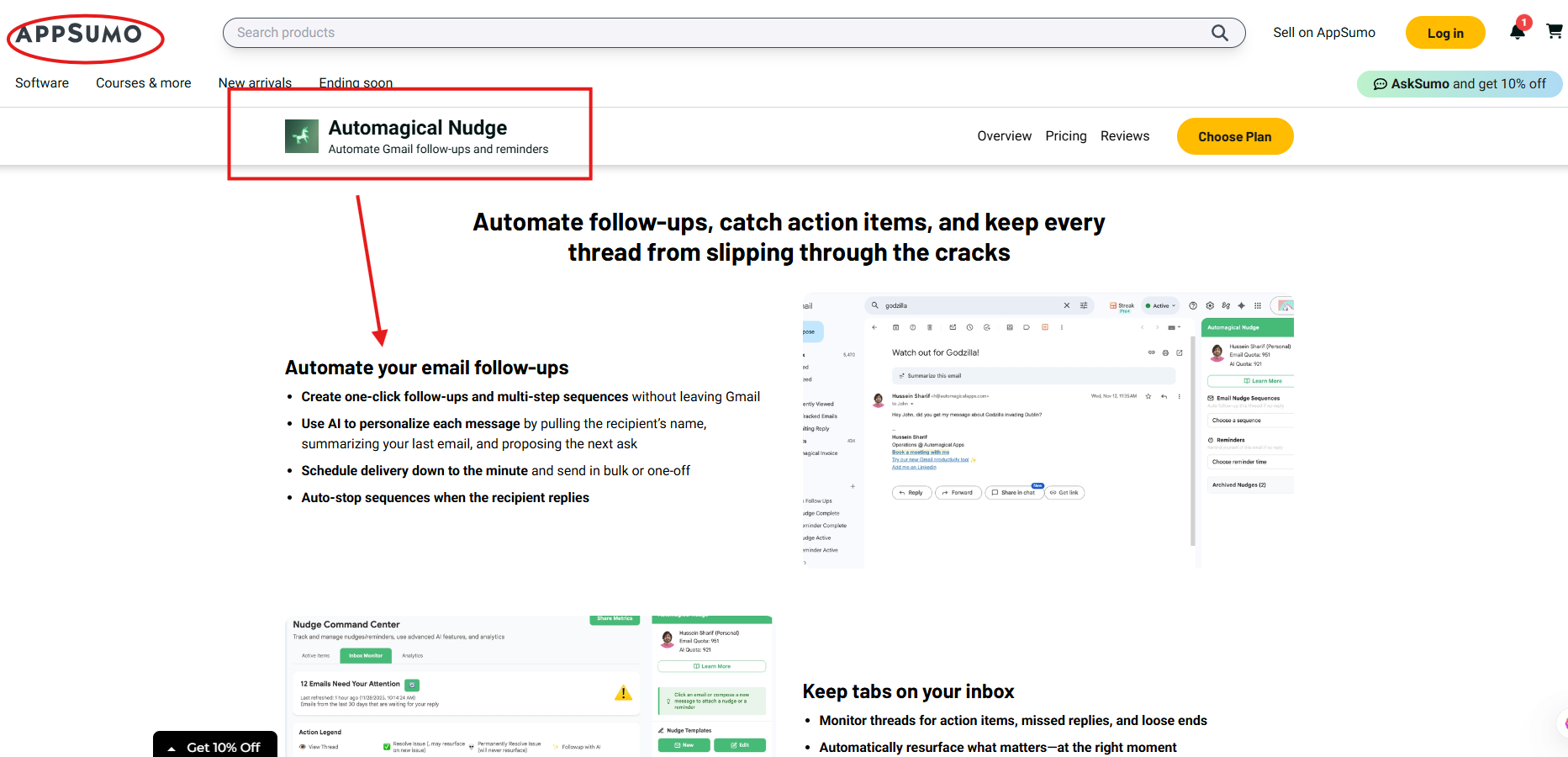
Automated follow-ups are the heart of Automagical Nudge. Whenever you send an important email, you can attach a sequence to it. For example:
- Day 0 – Your first email
- Day 3 – A friendly follow-up
- Day 7 – A final, polite nudge
The key detail: if the person replies, the sequence stops automatically. That is exactly what a good Gmail automation tool should do. It does not keep sending emails when the conversation is already active.
With Automagical Nudge, you can:
- Create one-click follow-ups right inside Gmail
- Build multi-step sequences without leaving your inbox
- Schedule follow-ups down to the minute
- Use sequences for one-off emails or send them in bulk
These automated sequences are useful for:
- Sales outreach and lead follow-ups
- Client proposals and quotes
- Contract and document approvals
- Invoice and payment reminders
- General “just checking in” emails
Instead of keeping a long list of “remember to follow up with this person” in your head or on paper, this Gmail automation tool takes over that job for you.
2. Inbox Monitor: Find Missed Replies and Action Items
The Inbox Monitor is one of the smartest and most useful parts of Automagical Nudge. It looks through your inbox and finds threads that might need your attention.
The Inbox Monitor helps answer questions like:
- Who never replied to your email?
- Which threads still have open tasks or decisions?
- Where did you say “I’ll get back to you” and then forget?
Instead of manually scrolling through old emails, the Gmail automation tool surfaces these important threads at the right moment. On top of that, it can:
- Show short, clear summaries of long conversations
- Draft quick responses that you can edit and send
This makes it much easier to keep deals, tasks, and relationships moving forward, without losing track in a crowded inbox.
3. Smart Reminders on Any Email
Sometimes you do not need a complex sequence. You just want a reminder so you do not forget about a specific email. Automagical Nudge makes this very easy.
You can:
- Add reminders to any email thread, whether you sent it or received it
- Set unlimited reminders for added peace of mind
- Choose an exact date and time or a flexible business-hour window
- Use reminders to follow up if no one replies
- Let the Inbox Monitor back you up even if you forget to set a reminder
This turns Gmail into a light and practical task system. The Gmail automation tool makes sure important messages come back to you instead of getting buried.
4. AI-Powered Email Nudges
Automagical Nudge includes AI to help you write follow-ups faster, but it keeps things simple and under your control.
The AI can:
- Use the recipient’s name in your message
- Summarize your last email in a short, clear sentence
- Suggest a next step or “ask” you can include
You always see the draft first and can edit it in your own tone. The Gmail automation tool is there to give you speed and structure, not to replace your style.
5. Live Dashboard Inside Gmail
Automagical Nudge also gives you a simple dashboard view right inside Gmail. From this dashboard you can see:
- All active email sequences
- Which messages are queued and what is sending next
- Who has already replied
- Which reminders are still pending
You can also:
- Pause a sequence
- Skip a message in the sequence
- Reschedule or edit follow-ups without leaving the email thread
Because this dashboard lives inside Gmail, the Gmail automation tool feels like part of your regular inbox, not a completely separate system you have to manage.
6. Desktop and Mobile Support
Automagical Nudge is designed to work both on your computer and on your phone.
- Chrome extension for desktop Gmail in your web browser
- Gmail add-on for the Gmail mobile app
This means you can set up follow-ups and reminders while you are at your desk and still stay in control when you are on the move. Your Gmail automation tool travels with you.
Who Should Use This Gmail Automation Tool?
Automagical Nudge is not trying to be a giant, all-in-one sales platform. It is a focused Gmail automation tool for people and teams who already live in Gmail and want their inbox to work smarter.
1. Sales Teams and Sales Managers
Sales work depends heavily on consistent follow-ups. Automagical Nudge helps sales reps and managers:
- Follow up on leads with clear, planned sequences
- Stop deals from going cold after one email
- Keep proposals and quotes moving forward
- Reduce the need for manual tracking in spreadsheets or notes
Because it works directly in Gmail, your team can adopt this Gmail automation tool quickly without a long learning curve.
2. Customer Support and Success Teams
Customer support and customer success teams can also benefit a lot from Automagical Nudge. They can:
- Follow up on tickets where the customer has not replied
- Check in after sending a possible solution
- Keep onboarding and success follow-ups on schedule
- Make sure no important support email gets lost in a busy inbox
For these teams, a reliable Gmail automation tool means fewer dropped threads and better customer experiences.
3. Small Businesses and Solo Founders
Small business owners and solo founders often run their entire operation out of Gmail. A tool like Automagical Nudge can make a big difference without adding complexity.
They can use this Gmail automation tool to:
- Follow up on invoices and payment reminders
- Chase project approvals and feedback
- Stay on top of vendor and partner conversations
- Keep longer projects from stalling just because someone forgot to reply
It helps a small team feel more organized and professional, while still working inside the Gmail interface they already know.
4. Operations and Admin Roles
Operations and admin staff often keep things running through email alone. For them, Automagical Nudge is a practical Gmail automation tool that:
- Turns important emails into trackable tasks using reminders
- Prevents internal approvals from sitting in inboxes for days
- Handles polite nudges to colleagues and clients when a response is overdue
- Keeps processes moving without forcing everyone into a complex project tool
Automagical Nudge Pricing: Website vs AppSumo
Pricing is a big part of choosing any Gmail automation tool, so let’s look at the two main ways to get Automagical Nudge: through its website and through AppSumo.
Website Plans (Overview)
On the official Automagical Nudge / Automagical Apps website, you will typically find:
- A Free plan with a limited number of emails, reminders, and AI credits so you can test the tool
- Paid plans with higher monthly email and reminder limits and more AI usage
- Business or team plans for larger usage, more advanced analytics, and better support
The free plan works if you just want to see how this Gmail automation tool fits your daily workflow. As your usage grows, you can move to one of the paid levels.
AppSumo Lifetime Deal
Automagical Nudge is also available on AppSumo as a lifetime deal. This is different from a monthly subscription. You pay once and get ongoing access under that plan.
| Tier | One-Time Price | User Licenses | AI Credits | Emails & Reminders | AI-Generated Nudges | Visual Analytics | Dashboard in Gmail | Chrome Extension | Gmail Add-on | Track in Gmail UI |
|---|---|---|---|---|---|---|---|---|---|---|
| License Tier 1 | $29 (lifetime) | 1 user | 50 | 50 | Yes | Yes | Yes | Yes | Yes | Yes |
| License Tier 2 | $99 (lifetime) | 4 users | 200 | 100 | Yes | Yes | Yes | Yes | Yes | Yes |
| License Tier 3 | $199 (lifetime) | 10 users | 500 | 200 | Yes | Yes | Yes | Yes | Yes | Yes |
The AppSumo deal also comes with a 60-day money-back guarantee, which gives you time to try the Gmail automation tool properly and see if it fits how you work.
Pros and Cons of Automagical Nudge
Pros
- Works directly inside Gmail, so there is almost no learning curve
- Strong at follow-ups, reminders, and inbox monitoring
- AI helps write clear, natural follow-up messages
- Inbox Monitor reduces the risk of missed replies and forgotten tasks
- Smart reminders make your inbox act like a simple task manager
- Chrome extension and Gmail add-on support both desktop and mobile
- AppSumo lifetime deal offers a budget-friendly way to lock in this Gmail automation tool
Cons
- Only works with Gmail, so it is not suitable if you use another email provider
- Not a full CRM or all-in-one platform; it is focused on inbox automation
- As with any newer tool, some users may see small glitches depending on their setup
FAQ: Automagical Nudge & Gmail Automation Tools
What is a Gmail automation tool?
A Gmail automation tool is a helper that sits on top of your Gmail account and handles some of the repetitive work for you. Instead of manually remembering every follow-up or searching for old threads, the tool can send reminders, schedule follow-up emails, and surface important conversations. The goal is to save time and make sure you do not miss important messages.
What does Automagical Nudge do as a Gmail automation tool?
Automagical Nudge connects to your Gmail and keeps an eye on your important threads. It lets you set follow-ups, build simple email sequences, and add reminders to any email you care about. If someone does not reply, the tool can nudge them or nudge you, so that conversations do not quietly die in your inbox.
Do I need to leave Gmail to use it?
No. You stay inside the Gmail interface you already use every day. Automagical Nudge appears as extra options, panels, and a dashboard within Gmail itself. This makes it feel natural and keeps this Gmail automation tool easy to use.
Who should use a Gmail automation tool like this?
Anyone who sends a lot of important emails and cannot afford to forget follow-ups can benefit from a Gmail automation tool. This includes sales reps, customer support teams, freelancers, small business owners, and founders. If your work depends on email and you often think “I should have followed up on that,” a tool like Automagical Nudge is worth serious consideration.
Is Automagical Nudge only for sales?
No. Sales is a strong use case, but not the only one. You can use Automagical Nudge to follow up on invoices, project approvals, support tickets, partnership emails, and more. The same Gmail automation tool can support many different roles in the same company.
Does a Gmail automation tool send spammy emails?
It does not have to. Automagical Nudge does not force you to send cold spam. You stay in control of your content and tone. The tool simply makes sure your genuine, helpful messages get sent on time instead of being forgotten.
Is Automagical Nudge available on AppSumo?
Yes. Automagical Nudge is available on AppSumo with lifetime tiers. You pay once and keep using the Gmail automation tool under that plan, and you also get a refund window if you decide it is not right for you.
Is it hard to set up Automagical Nudge?
Setup is straightforward. You install the Chrome extension for desktop or the Gmail add-on for mobile, connect your Gmail account, and you can start adding follow-ups and reminders right away. Most people can start using this Gmail automation tool within a few minutes.
Final Thoughts: Is Automagical Nudge the Best Gmail Automation Tool for 2026?
If your workday is driven by Gmail and you often worry about forgetting important follow-ups, Automagical Nudge is a strong contender for the best Gmail automation tool for you in 2026.
It does not try to do everything. It focuses on a real, everyday problem: lost and forgotten emails. With automated follow-ups, smart reminders, an Inbox Monitor, and a live dashboard right inside Gmail, it helps you keep deals, tasks, and relationships moving without adding a heavy new platform to your stack.
For sales teams, support teams, small businesses, and founders who live in Gmail, Automagical Nudge is absolutely worth a serious look—especially with its AppSumo lifetime deal available.
To know more about the lifetime deals, please visit our website.
THE SaaS TALK