

Best Scheduling Software Solutions 2026 – TidyCal Rated #1
Finding a simple way to book meetings should not feel like a full‑time job. Many tools promise to be the best scheduling software, yet they overload you with settings, extra steps, and high monthly fees. TidyCal takes the opposite path: it keeps things clean, easy, and very affordable, while still giving you the power you need to run your day.
This guide walks you through why so many users now see TidyCal as one of the best scheduling software tools for 2026. The language is simple, the ideas are clear, and each section focuses on how TidyCal can make your scheduling faster, smoother, and more profitable.
1. What Makes a Tool the Best Scheduling Software in 2026?
Before we talk about TidyCal itself, it helps to know what really matters in a modern booking tool. A tool can only be called the best scheduling software for you if it does a few important things extremely well. If it fails in even one of these areas, you feel the pain in your daily work.

Here are the core qualities that matter most:
- It is quick to set up and easy to use every single day.
- It syncs with your calendars so you never get double‑booked.
- It supports both free and paid meetings when you need them.
- It works for solo users but can also grow with teams and agencies.
- Its pricing is fair and does not explode as you add more features or people.
TidyCal was built with these exact points in mind. It does not try to do everything. Instead, it focuses on the parts of scheduling that save you the most time and bring you more bookings with less stress. That clear focus is a big reason many people rank it among the best scheduling software options available today.
2. Meet TidyCal: Simple Calendar Management and Booking
TidyCal is a calendar management and booking solution created by the AppSumo team. It was designed as a simpler, more affordable alternative to big names like Calendly and Doodle. The core idea is direct and honest: help individuals, freelancers, agencies, product managers, and sales teams book more meetings with less friction and fewer clicks.
A few key facts show how widely it is already used:
- Over 200,000 users have signed up since launch.
- More than 3,700,000 bookings have been created through the platform.
- Users have generated over $9 million in revenue using paid bookings.
These numbers prove that TidyCal is not a tiny side project. It is a lean, focused product that people rely on every day. If you care about choosing the best scheduling software for long‑term use, real adoption, and real revenue, like this matters a lot.
3. TidyCal at a Glance
Here is a quick overview of what TidyCal offers, so you can see the big picture before going into the details.
| Area | What TidyCal Offers |
|---|---|
| Product type | Calendar management and booking solution |
| Main use | Simple meeting scheduling with free and paid booking pages |
| Ideal users | Marketing agencies, product managers, sales managers, freelancers, entrepreneurs |
| Booking types | One‑on‑one meetings, group events, date polls |
| Calendar integrations | Google, Office 365, iCal (multiple accounts and sub‑calendars) |
| Payment options | Stripe and PayPal for paid bookings |
| Automation | Custom email reminders, auto‑created meeting URLs, confirmation redirects |
| Pricing style | Free plan + lifetime deals (pay once, use forever) |
| Deal platforms | Available via AppSumo and also listed on deal sites like Dealify |
If you enjoy tools that are clear about what they do and how they charge, this simple structure will feel refreshing and very easy to trust.
4. Key Features That Make TidyCal Stand Out
4.1 Custom Booking Pages That Match Your Brand
TidyCal lets you build custom booking pages that actually feel like part of your brand. Instead of a generic form, you get a page that reflects your voice and your offer. You can shape the experience so visitors instantly know what you do and how to book you.
With TidyCal, you can:
- Choose your own colors and visual style.
- Show or hide specific booking types on each page.
- Create separate booking pages for different services or teams.
Because you control which booking types appear, you can drive people toward the exact meetings you want them to book: discovery calls, coaching sessions, demos, mentoring, or group classes. A tool can only be called the best scheduling software for professionals if it helps you look sharp and consistent in front of your clients, and TidyCal leans into that with simple but powerful customization.
4.2 Flexible Availability and Smart Time Controls
Your time is your main asset, so your booking tool has to protect it. In TidyCal, availability is both flexible and easy to set up. You do not need to be highly technical to feel in control of your calendar.
You can:
- Create detailed availability schedules for different days or services.
- Set the default availability and override it for special dates and events.
- Add buffer time before and after meetings to avoid back‑to‑back stress.
- Set booking limits so your calendar never becomes overloaded.
These settings are clear and simple, so you always know what you are changing. This level of control with an easy interface is one of the reasons many solo workers and small teams see TidyCal as the best scheduling software for everyday use.
4.3 Unlimited Booking Events and Types
Many scheduling tools limit the number of event types you can create unless you pay for higher plans. TidyCal takes a different approach. You get unlimited booking types, even on the lifetime deal.
With TidyCal, you can create:
- One‑on‑one meetings for direct calls or private sessions.
- Group events for webinars, classes, or team calls.
- Special events with custom rules and availability.
- Date polls that let people vote on the best time for a group meeting.
Date polls are especially useful when you want to avoid long email chains. You simply create options, share the link, and TidyCal collects responses for you. This kind of feature is often locked behind high‑tier plans in other tools trying to be the best scheduling software, but here it is part of a simple, low one‑time price.
4.4 Strong Calendar Integrations to Avoid Double‑Bookings
TidyCal connects directly with major calendar systems, so your availability is always accurate. You can connect:
- Google Calendar
- Office 365
- Apple iCal
You can link multiple accounts and even sub‑calendars, which is perfect if you juggle personal and business schedules. The system checks your real‑time availability across all linked calendars, so you do not get double‑booked or surprised by hidden events.
If you have ever missed a call because one calendar did not know about another, you know how painful that can be. Any real contender for the title of best scheduling software must solve this problem first, and TidyCal does it with a clean, simple connection flow.
4.5 Paid Bookings with Stripe and PayPal
For many professionals, meetings are not just time slots—they are products you sell. TidyCal turns your time into a clear and smooth revenue stream by allowing you to set up paid bookings.
You can:
- Attach a price to a booking type.
- Accept payments through Stripe and PayPal.
- Join an exclusive directory to promote your services.
This is perfect for coaches, consultants, agencies, and freelancers who want one simple tool that can both book and bill. When your scheduling tool helps you get paid quickly and reliably, it gets much closer to being your personal best scheduling software, especially if you run a time‑based business.
4.6 Helpful Automation and Smart Reminders
TidyCal includes several automation features that quietly save you time and reduce no‑shows. You do not need to build complex workflows. The platform handles the basics for you in a clear and friendly way.
Key time‑saving extras include:
- Custom email reminders that nudge people before their meeting.
- Auto‑created meeting URLs so you never forget to add a video link.
- Confirmation redirects that send people to a thank‑you page, an upsell, or a helpful resource after they book.
These touches build trust with your clients and reduce manual follow‑up. Many users who switch from other tools say that TidyCal “just feels lighter” because it does what they need without layers of clutter.
5. TidyCal Pricing and Lifetime Deals
One of the strongest reasons people consider TidyCal among the best scheduling software tools is its pricing. Instead of forcing you into long‑term monthly subscriptions, TidyCal offers a very attractive lifetime model and a generous free tier.
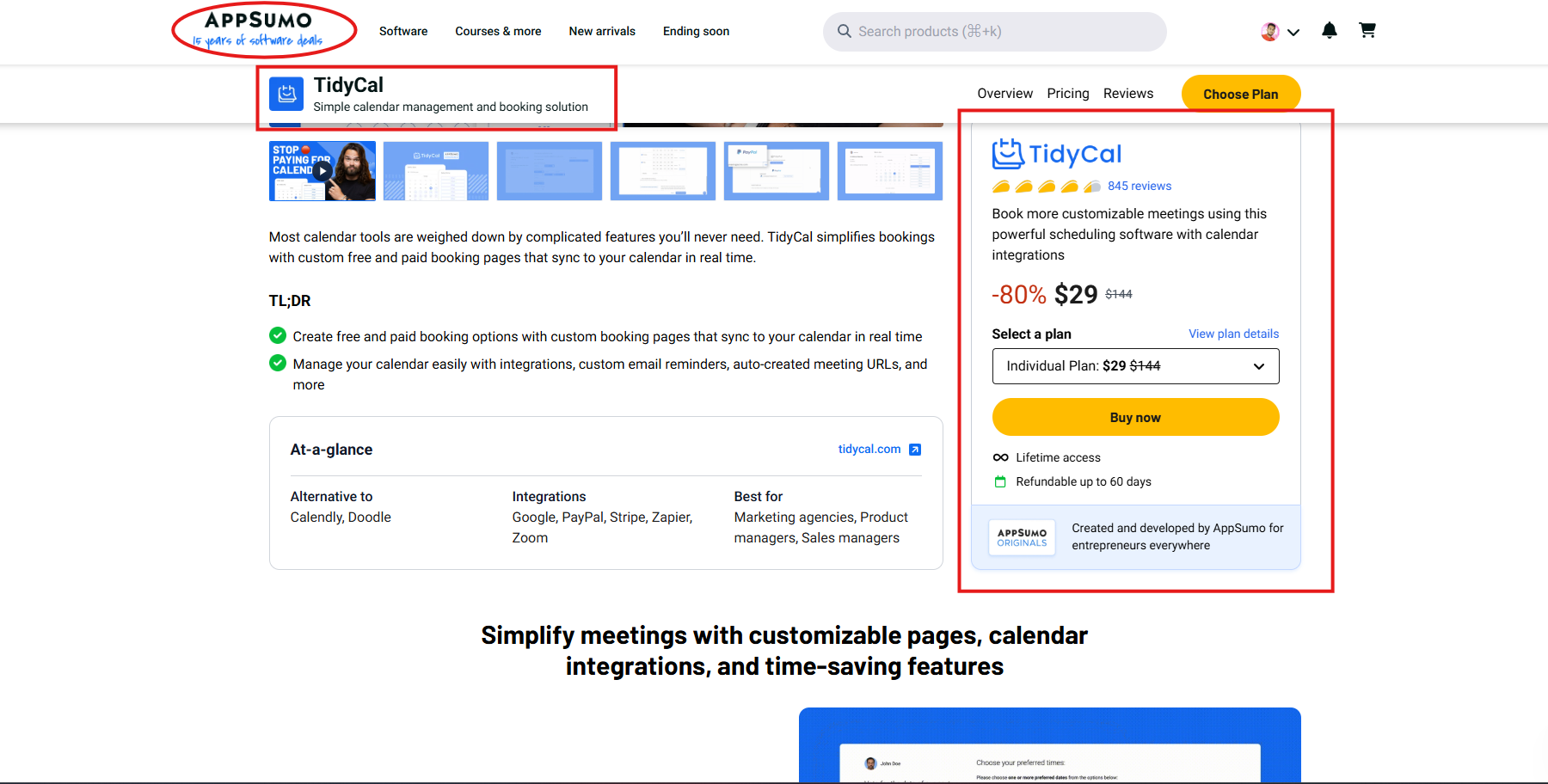
From the available information, the main points are:
- A forever‑free plan so you can try the tool with no credit card.
- An Individual lifetime plan at $29.
- An Agency lifetime plan at $79 with more calendars and unlimited team members.
- A 60‑day money‑back guarantee when purchased via AppSumo.
On top of that, TidyCal is also featured on deal platforms like Dealify, which makes it even easier for deal‑focused buyers and agencies to grab long‑term access at a one‑time price instead of stacking more subscriptions.
5.1 Individual vs. Agency Plan
Here is a clearer look at how the Individual and Agency plans compare.
| Feature | Individual Plan ($29, Lifetime) | Agency Plan ($79, Lifetime) |
|---|---|---|
| Lifetime access | Yes | Yes |
| Integrated calendars | Up to 10 | Up to 25 |
| Integrations | Basic (Google, Office 365, iCal) | Advanced (All Basic plus Zoom and Teams) |
| Team members | 0 (solo use) | Unlimited |
| Bookings per month | Unlimited | Unlimited |
| Paid bookings (Stripe & PayPal) | Included | Included |
| SMS reminders (U.S. & Canada) | Included | Included |
| Dedicated team pages | Not included | Included |
| Team collective meetings | Not included | Included |
| Team round‑robin meetings | Not included | Included |
| Custom booking & branding | Included | Included |
| Translation in 30+ locales | Included | Included |
| TidyCal branding | Reduced | Reduced |
These plans are simple to understand, and the one‑time nature of the pricing is a huge draw. If you are trying to select the best scheduling software without locking yourself into rising subscription costs, this structure is hard to beat.
6. How TidyCal Compares to a Typical Market Option
On its sales pages, TidyCal compares its lifetime deal to a typical competing product that charges yearly for similar features. The idea is clear: show what you normally pay each year for common tools, then show what you get in one lifetime purchase with TidyCal.
Here is a simplified version of that comparison:
| Feature | TidyCal Lifetime Deal | Typical Market Option |
|---|---|---|
| Unlimited booking types | Included for a one‑time fee | From approx. $96/year |
| Custom availability | Included | From approx. $96/year |
| Custom colors/branding | Included | From approx. $144/year |
| Max calendar connections | 10 connections for $29 | 6 connections from approx. $144/year |
| Custom email reminders | Included | From approx. $144/year |
| Group bookings | Included | From approx. $96/year |
| Auto‑created meeting URLs | Included | From approx. $96/year |
| Confirmation redirect | Included | From approx. $144/year |
| Paid bookings | Included | From approx. $144/year |
| Integrations | Included | From approx. $144/year |
The pattern is simple: other tools frequently lock core features behind higher annual plans. TidyCal bundles them into a small one‑time payment. For users who want the best scheduling software in terms of price‑to‑value, this type of offer is extremely compelling.
7. Who Should Consider TidyCal?
TidyCal is built for people who want results without unnecessary complexity. It is a strong fit in several real‑world situations where scheduling can easily get out of hand.
You will likely enjoy TidyCal if you are:
- A marketing agency booking client calls, strategy sessions, or performance reviews.
- A product manager running user interviews, stakeholder updates, and team syncs.
- A sales manager or sales rep booking demos, discovery calls, and follow‑up meetings all day long.
- A coach, consultant, or freelancer selling paid sessions and needing clean booking and payment flows.
- A small team or startup that needs dependable scheduling without heavy monthly fees.
If you see yourself in any of these groups, TidyCal is a serious candidate for your personal list of the best scheduling software tools to test and adopt.
8. Why TidyCal Feels Different from Many Other Tools
Many scheduling apps try to impress you with complex dashboards and long configuration screens. TidyCal chooses a calmer approach. The interface is simple, the options are clearly explained, and most people can publish their first real booking page in a single sitting.
Under that simple surface, though, you still get:
- Unlimited events and booking types.
- Real‑time calendar sync across major providers.
- Solid payment options through Stripe and PayPal.
- Helpful automation and reminder tools.
- Lifetime access that removes subscription pressure.
This blend of simplicity and depth is exactly what many users are looking for when they talk about the best scheduling software for real work, not just for nice screenshots.

9. Final Thoughts: Is TidyCal Worth It?
If you want a clean, affordable tool that lets you book more meetings, protect your calendar, and even get paid for your time, TidyCal is very hard to ignore. It was built to be a simpler, more wallet‑friendly alternative to larger tools, and the growth numbers show that many users agree.
You get a generous free plan, lifetime deals that remove subscription stress, and features that work for solo users and full agencies alike. For many people in 2026, that is exactly what the best scheduling software should look like: simple, focused, and fair.
The next step is easy. Visit TidyCal, check out the lifetime offer on platforms like Appsumo, and create your first booking page. In just a short time, you will see whether this is the right fit to handle your scheduling and help your business grow.
To know about the latest LTD deal, please visit:
The SaaS Talk