
Top 5 Ways Approval Workflow Software Saves Time – ApproveThis
Approvals can turn a simple job into a slow-moving puzzle. One person says, “Looks good” in an email. Another person asks for a change in Slack. A third person is on vacation. And suddenly, nobody can tell what is approved, what is still waiting, and who is supposed to do the next step.
That is the exact moment where approval workflow software stops being “nice to have” and becomes the calm center of your day.
ApproveThis is built for that messy, real-world approval problem. It gives you one place to request, route, review, and complete approvals, with clear ownership at every step. And the best part is that it can collect approvals from people outside your company without forcing them to learn a new tool or create an account. That is a big reason teams pick approval workflow software like ApproveThis when speed matters.
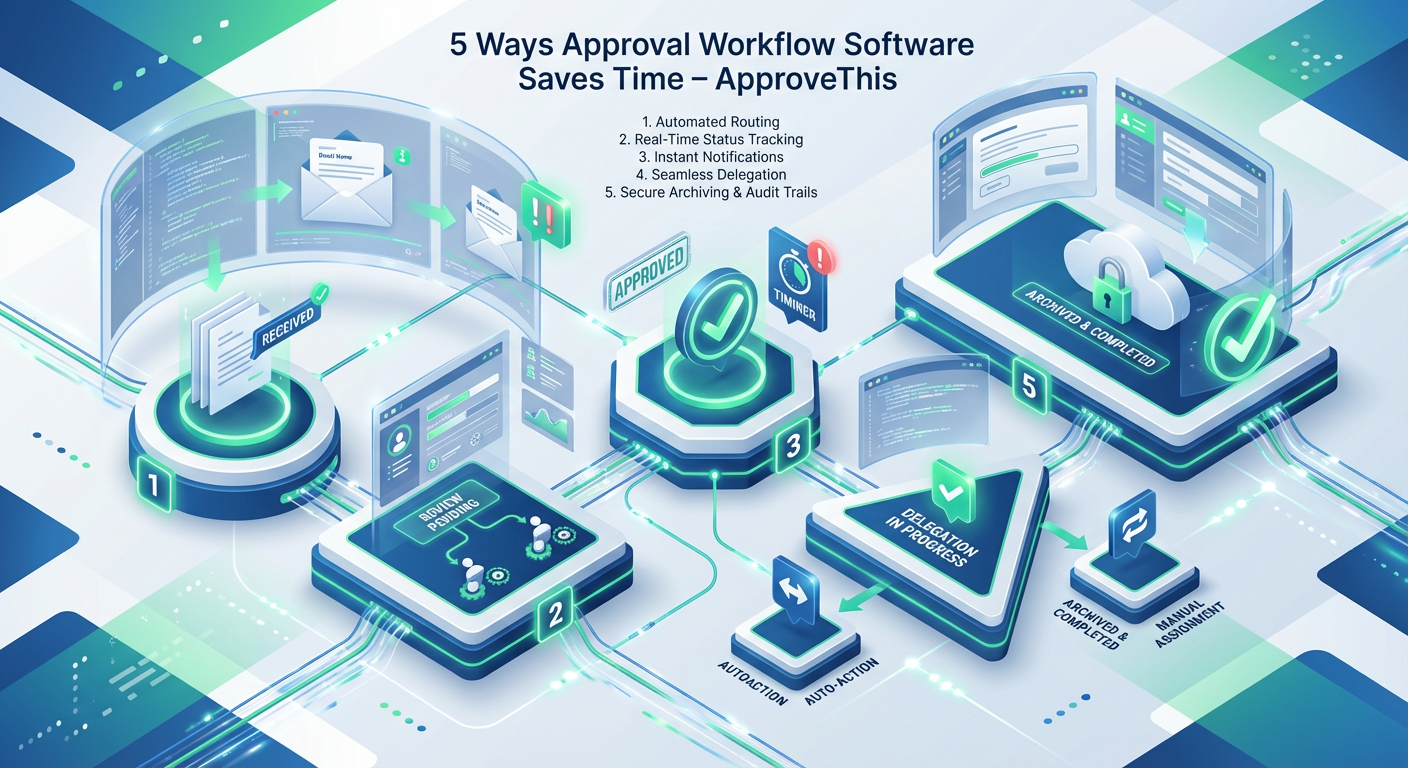
ApproveThis also shows up where work already happens. You can kick off approvals by email, by forms, or by integrations. You can approve with one-click email actions. You can track every request from start to finish in a searchable dashboard. In short, it behaves like approval workflow software that respects your team’s time.
This guide focuses on the practical side. Not fluffy theory. You will see five clear ways approval workflow software saves time, and exactly how ApproveThis supports each one with features like multi-step workflows, approval groups, delegation, reminders, audit logs, and integrations.
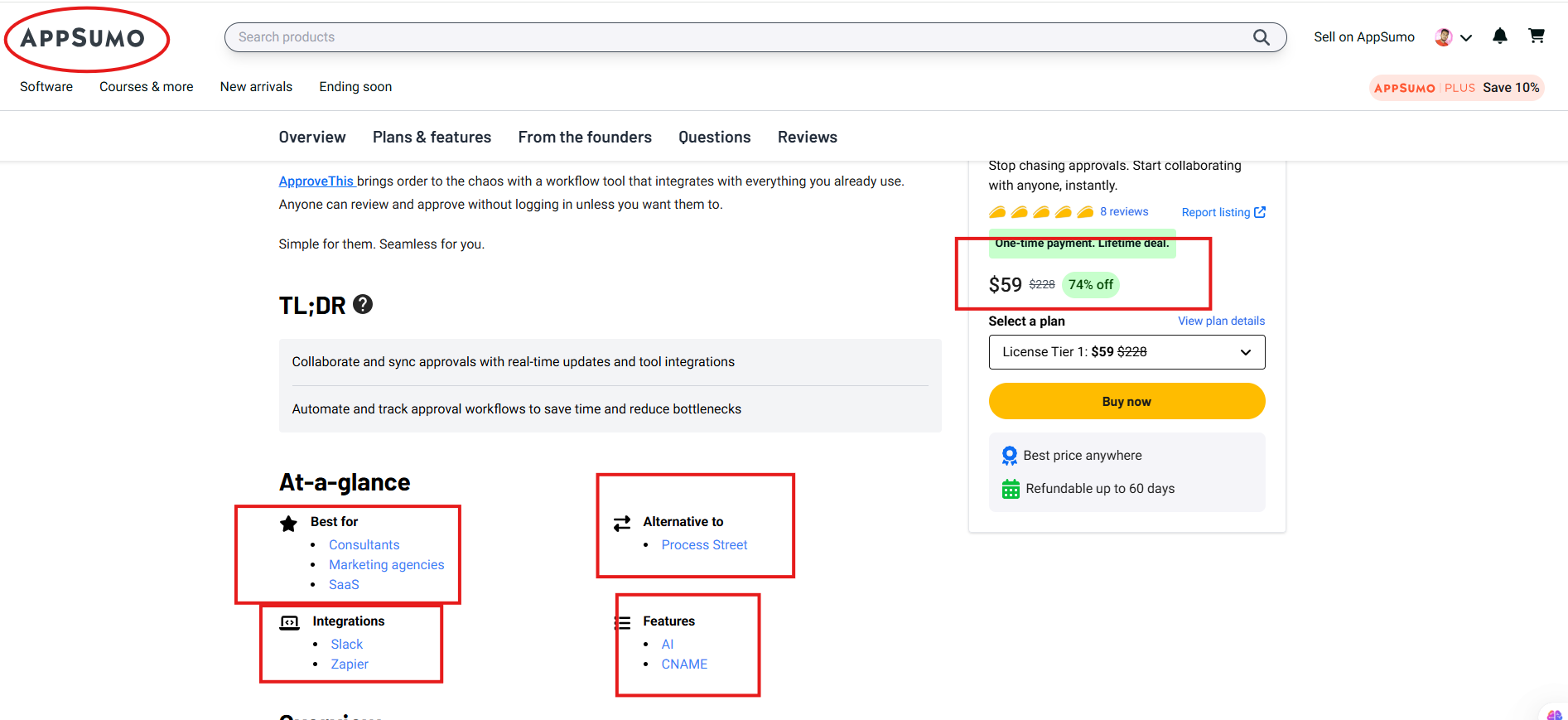
Note: ApproveThis is also available on AppSumo as a one-time payment lifetime deal, with a 60-day money-back guarantee. If you like tools that pay for themselves quickly, that matters. And it fits perfectly with what good approval workflow software should be: simple, fast, and easy to roll out.
Quick snapshot: what ApproveThis does (in plain words)
ApproveThis is a dedicated approval management tool that helps you request, monitor, and track approvals for things like sales deals, contracts, designs, vendors, bills, vacations, purchases, and more. It brings approvals into one organized flow so you can see what is pending, who is responsible, and what needs action now. That is the daily value of approval workflow software when you actually use it.
Here is what stands out
- Start approvals your way: by email, form, or integration. This is a huge time saver because starting is where many processes fail. Good approval workflow software makes starting painless.
- Approvals from anyone, anywhere: loop in teammates, clients, or vendors with a simple link, with no login or training required. This removes the friction that usually slows approval workflow software down.
- Multi-stage workflows: make sure everyone signs off before you move forward. That is what approval workflow software is supposed to enforce, without adding paperwork.
- Delegation: keep approvals moving when someone is out of the office. This is one of the most underrated benefits of approval workflow software.
- Searchable dashboards + audit logs: visibility for busy teams, and exportable logs for risk, compliance, internal controls, and legal needs. That is “audit-worthy” approval workflow software in everyday language.
ApproveThis is positioned as best for consultants, marketing agencies, and SaaS, and it is described as built for agencies and busy teams. It is also mentioned as an alternative to Process Street. These details matter when you are choosing approval workflow software that fits your style of work.
If you want to explore the product directly, start with the official site: ApproveThis.
The core idea: time disappears in the gaps
Most teams do not lose hours in the “approval” itself. They lose hours in the gaps.
- Waiting for the next person because no one knows who owns the next step
- Re-sending context because the request was incomplete
- Copying updates between tools because the status is scattered
- Following up because reminders are manual
- Rebuilding an audit trail after the fact because the approval lived in three places
The right approval workflow software closes those gaps. ApproveThis does it by making requests structured, routing clear, and status visible, while still letting people respond quickly through email or a simple link. That combination is why modern approval workflow software is such a practical upgrade.
Now, let’s get into the five most direct ways ApproveThis saves time.
1) It kills the “where are we on this?” meeting
If you have ever joined a status meeting just to learn whether something got approved, you already understand the cost. These meetings are not evil. They are a symptom. They exist because there is no shared truth. The goal of approval workflow software is to make the truth obvious.
ApproveThis tracks every approval in one place—from the resolution request. You can see what is pending, who is responsible, and what needs action now. That turns a weekly check-in into a quick glance. This is what approval workflow software looks like when it is actually doing its job.
How ApproveThis saves time here
- Approval management dashboard: one view for active requests, pending items, and progress
- Searchable organization: fewer “lost” requests and less hunting
- Threaded comments: discussion stays attached to the request, not buried in chat or email
In real life, teams are juggling multiple approvals at once. Marketing is approving assets and PPC spend. Sales is getting pricing and contracts signed off. Accounting is approving purchases and travel. Support is handling credits and escalations. The dashboard becomes a daily control panel, and approval workflow software becomes the system that reduces noise.
A simple example
Imagine a marketing team approving a set of ad creatives. Without structure, feedback goes everywhere. With ApproveThis, a request is created, comments live in one place, and the approval moves step by step. When someone asks, “Are we approved?” you do not answer from memory. You point to the request. That is the quiet power of approval workflow software.
2) It reduces back-and-forth by collecting the right info upfront
A surprising amount of approval delay comes from missing information. Someone submits a request, a reviewer replies with questions, the requester answers later, and the clock keeps running. Good approval workflow software solves this by standardizing the start of the process.
ApproveThis supports forms for any approval, built to collect the right info every time. You can quickly create forms, and the product also mentions a library of 150 pre-built forms and the option to generate a new form instantly with AI. This matters because structured input is one of the biggest speed boosters in approval workflow software.
Where this pays off fast
- Budgets: fields for amount, vendor, due date, cost center, notes
- Contracts: fields for term length, renewal date, key clauses, attachment links
- Creative reviews: fields for audience, channel, deadline, file links, brand checklist
- Access requests: fields for system, role, business reason, urgency
Even if your team loves flexibility, approvals benefit from consistency. A good form is not bureaucracy. It is kindness. It prevents the reviewer from playing detective. That is why approval workflow software often saves the most time before the approval even begins.
The “hand-off” effect
When forms are clean, reviewers can approve faster. When reviewers approve faster, delivery speeds up. That is a compounding benefit. And it is exactly how approval workflow software turns into a real productivity tool instead of just another platform.
3) It lets you start approvals directly from email (so people do not resist it)
A tool can be powerful and still fail, simply because people do not start using it. Adoption is everything. ApproveThis leans into this reality with email-based kickoff options, which is a strong move for approval workflow software because email is still where many requests begin.
ApproveThis supports
- A custom email inbox for approvals: set up a branded inbox where people send emails, and you get structured, trackable approvals without changing how they work.
- Smart mailboxes: trigger approvals straight from your inbox using an address like
[email protected]. - Email CC approvals: CC an approvals address to create a live, trackable approval request for everyone on the “To” line, with no setup or configuration.
This is the kind of approval workflow software feature that sounds small until you see what it does. It removes the “I’ll do it later” delay. If someone can start a request the same way they already ask for things, the workflow happens naturally.
Why does this save so much time
- No training sessions just to “teach the tool.”
- Fewer incomplete requests because the workflow captures and tracks them
- Less context switching because kickoff happens inside the inbox
ApproveThis also supports one-click email approvals. That means reviewers can respond quickly, without logging in, when you choose to run it that way. And again, this is what effective approval workflow software looks like: it adapts to humans, not the other way around.
4) It keeps work moving with delegation, reminders, and clear ownership
Approvals often stall for one simple reason: someone is unavailable. Vacation, travel, meetings, or just overload. Traditional processes do not handle this well. They rely on luck and follow-up. ApproveThis includes approver delegation, which helps a workflow keep moving if an approver is out of the office. This is a classic “bottleneck breaker” feature in approval workflow software.
ApproveThis also emphasizes reminders you can customize so approvers are notified at the right time without being overwhelmed. That balance matters. If reminders are too aggressive, people tune them out. If reminders are too weak, approvals drift. The right approval workflow software lets you nudge without nagging.
The real time saver: ownership is visible
When you can see exactly who is responsible for the next step, you stop guessing. You stop “reply all” pings. You stop sending messages that start with “Just checking in…”
ApproveThis supports multi-stage approval workflows, so you can ensure everyone has signed off. That structure is useful in areas like:
- Sales: pricing and contracts approved before signing
- IT: hardware issuance, upgrades, software purchases, and security reviews
- Engineering: change requests, feature approvals, system access
- HR: new hire processes, comp adjustments, promotions, title changes
- Accounting: purchases, credit cards, travel approvals
- Support: credits, provisioning, escalations (even when an approver does not use your helpdesk software)
In each case, approval workflow software saves time by turning an unclear chain of messages into a clear sequence of decisions.
5) It syncs with the tools you already use, so you stop copying updates around
Copying status updates between tools is quite time-consuming. You might not notice it in one day. But over weeks, it becomes hours. ApproveThis highlights integrations through Zapier and also mentions an API and webhooks in the scraped product info. That matters because approval workflow software becomes far more valuable when it connects to your stack.
ApproveThis integration options are mentioned
- Zapier: triggers and actions for popular apps, with “full coverage” described in the scraped info
- API: create and approve requests programmatically; pull status for dashboards
- Webhooks: create requests on events; send real-time updates back to your tools
- Slack: listed as an integration in the scraped info
This is where modern approval workflow software stops being a standalone “approval inbox” and becomes a workflow engine. If a deal is created, an approval can start. If a budget line changes, a request can be triggered. If approval status updates, your team can see it where they work.
A practical automation story
- A new contract is ready in your system
- A Zapier automation triggers an approval request
- Reviewers approve via email or link
- Status updates flow back to your dashboard or tool via API/webhooks
That loop is clean. It is measurable. And it is exactly how approval workflow software saves time without asking people to do more work.
Feature checklist (so you can scan fast)
ApproveThis includes the following features (as provided in your notes):
- Approval flow engine with multiple steps and approval groups
- Branching, multi-step workflows, and conditional approvals for escalations
- Budget thresholds so the right people approve
- Group approvers for collaborative decisions
- Assign delegates to keep things moving during vacations
- Approval management dashboard
- Notifications
- Threaded comments
- Accept approvals via mobile-friendly web form or custom email inbox
- Accept requests via email, custom mailbox, custom form
- Custom form editor
- Requests from registered users, users with valid emails, or anonymous users
- Integrations and automation: Zapier, API, webhooks (and Slack listed)
- Audit logging with exportable, searchable logs
- One-click email approvals
This mix is a strong sign that ApproveThis is built as approval workflow software for teams that need speed and clarity, not a complicated process platform.
AppSumo lifetime deal details (ApproveThis)
Approve is listed on AppSumo as a one-time payment, lifetime deal, with a 60-day money-back guarantee and the requirement to activate your license within 60 days of purchase. It also states you get all future updates for the plan you buy (Basic for Tier 1, Business for Tiers 2+), and you can upgrade or downgrade between license tiers.

Pricing and tiers (from your scraped info)
| License tier | One-time price | Approval requests/month | Workflows | Approvers | Integration suite | Custom Approval Hub |
|---|---|---|---|---|---|---|
| Tier 1 | $59 | 25 | Unlimited | Unlimited | Not included | Not included |
| Tier 2 | $149 | 50 | Unlimited | Unlimited | Included | Included |
| Tier 3 | $249 | 150 | Unlimited | Unlimited | Included | Included |
If you are comparing tools, this is a big reason people look at ApproveThis as approval workflow software for agencies and small teams. You get the core workflow engine, plus a predictable, one-time purchase option.
Who ApproveThis is best for (and why that matters)
ApproveThis is described as best for:
- Consultants
- Marketing agencies
- SaaS
It is also described as built for agencies and busy teams, and trusted by 250+ growing agencies and modern teams. That positioning makes sense because agencies and SaaS teams often approve work across boundaries. A client is involved. A contractor is involved. A vendor is involved. Many approvals happen with people who will never log into your internal systems. That is exactly where approval workflow software either shines or fails.
ApproveThis leans into “approvals from anyone, anywhere,” using simple links and optional no-login approval. That reduces friction. And friction is the silent killer of approval speed.
Use cases that feel instantly familiar (and how to run them)
Below is a practical list of common approval areas mentioned on the site, plus how approval workflow software helps in each.
| Team | What gets approved | What usually slows it down | How ApproveThis helps |
|---|---|---|---|
| Marketing | Social assets, copy, PPC spend | Scattered feedback | Centralized request + comments + tracking |
| Support | Credits, service provisioning, escalations | Approver not in Helpdesk | Simple link approvals + tracking |
| Accounting | Purchases, cards, travel | Missing info, late replies | Structured forms + reminders + visibility |
| Engineering | Change requests, features, and access | Unclear sign-off chain | Multi-stage workflows + delegation |
| IT | Hardware, upgrades, software purchases | Bottlenecks | Clear ownership + audit logs |
| Sales | Pricing, contracts | Last-minute approvals | Fast kickoff + one-click approvals |
| Management | Delegation of approval compliance | Audit trail gaps | Exportable, searchable logs |
| HR | Hiring, comp changes, promotions | Slow routing | Workflows + structured requests |
When you run these through approval workflow software, you are not “adding process.” You are removing waiting.
What makes ApproveThis feel different in daily work
Many tools claim they do workflows. What people really want is fewer follow-ups and fewer surprises. ApproveThis puts a lot of emphasis on:
- Kickoff that fits real habits (email, forms, integrations)
- Approvals that do not require logins (when you want that)
- Clarity in tracking (pending, responsible, next action)
- Audit readiness (exportable logs)
That combination is what you want from approval workflow software if your goal is speed without chaos.
There is also a tone in the product message that matters. It does not pretend that approvals are glamorous. It admits they can feel like herding cats. Then it focuses on making approvals simple, visible, and controlled. That honesty is refreshing, and it fits the practical promise of approval workflow software.
A simple rollout plan (so you start fast, not perfect)
If you want ApproveThis to save time quickly, do not start with a “company-wide approval transformation.” Start with one approval type that is painful and frequent.
Here is a clean approach
- Pick one workflow you do every week (budget, creative review, purchase request, contract sign-off).
- Create a simple form or email kickoff path.
- Add the people who approve most often. Use delegation if coverage matters.
- Turn on reminders so requests do not go stale.
- Track it for two weeks, then tighten the form fields and steps.
This is exactly how teams succeed with approval workflow software: small start, fast learning, visible wins.
FAQ (short, clear answers)
Do people need an account to approve in ApproveThis?
ApproveThis supports approvals from anyone with a simple link, and it is described as allowing review and approval without logging in unless you want them to. That is a major usability win for approval workflow software.
Can we start approvals from email?
Yes. ApproveThis supports a custom email inbox for approvals, smart mailboxes that trigger workflows, and email CC approvals that create trackable requests. This is one of the strongest adoption features in approval workflow software.
Does it support multi-stage approvals?
Yes. ApproveThis supports multi-stage approval workflows and a flow engine with multiple steps and approval groups, including branching workflows and conditional approvals for escalations. That is core approval workflow software functionality.
What about reporting or audits?
ApproveThis describes audit logging with exportable, searchable logs designed to satisfy risk management, compliance, internal controls, and legal teams. This is what audit-friendly approval workflow software should include.
Is it available as a lifetime deal?
Yes. ApproveThis is available on AppSumo with lifetime access tiers, plus a 60-day money-back guarantee, and a 60-day activation window. That makes it an appealing approval workflow software for cost-conscious teams.
Final thoughts: the real time savings are mental, not just minutes
When approvals are messy, you carry them in your head. You remember who is late. You worry about whether a decision is documented. You wonder if the right people signed off. That mental load is exhausting, and it makes you slower.
ApproveThis is designed to take that load off your plate. It centralizes approvals, makes kickoffs simple, keeps accountability visible, and supports fast responses through email or links. That is why teams adopt approval workflow software like ApproveThis, especially in agencies, SaaS, and consulting work where approvals cross internal and external lines.
If you want to see how it feels, ApproveThis offers a 14-day free trial on the website, and it is also available on AppSumo as a lifetime deal. Either way, the goal is the same: stop chasing approvals and start moving work forward with approval workflow software.
To know about the latest LTD deal, please visit:
The SaaS Talk